
Windows关闭防火墙
打开控制面板,找到 控制面板\系统和安全\Windows Defender 防火墙 ,在左侧找到 启用或关闭WindowsDefender防火墙 点击
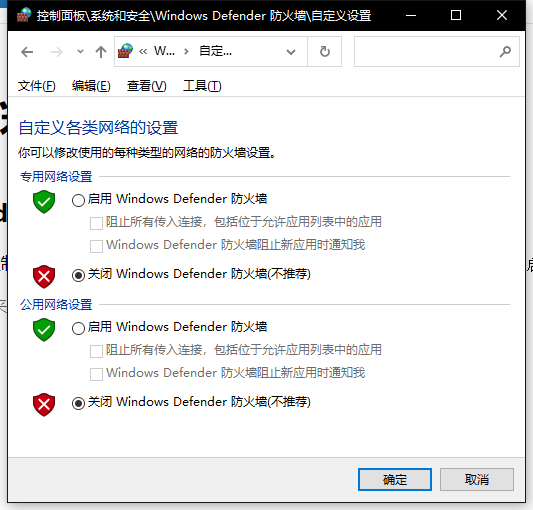 设置如图
设置如图
将两个网络的防火墙都关闭后确定
Linux关闭防火墙
以下两种方式任选一种即可,一种用不了的换另一种
systemctl
启动:systemctl start firewalld
查看状态:systemctl status firewalld
停止:systemctl disable firewalld
禁用:systemctl stop firewalld
iptable
查看防火墙状态:service iptables status
停止防火墙:service iptables stop
启动防火墙:service iptables start
重启防火墙:service iptables restart
关闭防火墙自启:chkconfig iptables off
开启防火墙自启:chkconfig iptables on
vps安全组放行端口
在进入vps实例的管理界面,找到安全组,注意安装组里面有出站规则和入站规则
出站规则放行全部(出站就是vps里的进程通过端口访问外网的内容)
入站放行常用端口,(如果开服的话也同时放行服务器端口)
 出站规则
出站规则
 入站规则
入站规则